CoinStats - Crypto Tracker
Coin Stats, Inc . - Crypto Portfolio Tracker AppFinance
4.52.68K Reviews
- Version
- 5.31.0
- Installs
- 1.00M
- Age Rating
- Everyone
Screenshots

Our Review of CoinStats - Crypto Tracker
 Analysis by Appyee
I tend to judge a finance app by what happens after the first burst of curiosity wears off. A crowded dashboard can feel exciting for a week, then turn into one more thing to check. CoinStats - Crypto Tracker is most useful when I give it a steady job: bring my crypto holdings and market watch into one view, so I can check deliberately instead of opening several exchange apps out of habit.
A useful first week, if you set it up with a purpose
CoinStats is a free finance app from Coin Stats, Inc. - Crypto Portfolio Tracker App. It has a 4.5 average from around 104,000 ratings, and more than a million installs. Those figures suggest it has reached well beyond a niche audience, but they do not tell me whether it will suit your routine. That depends more on how many places you currently check and whether you want a portfolio overview or a trading venue.
In the first few days, I would avoid connecting everything at once. Start by adding the assets you actually care about, then decide whether you need exchange or wallet connections. That small bit of restraint makes the initial setup easier to understand and gives you a baseline to compare against. The app’s broad coverage can be helpful, but a long list of coins is not automatically useful if most of them are irrelevant to your decisions.
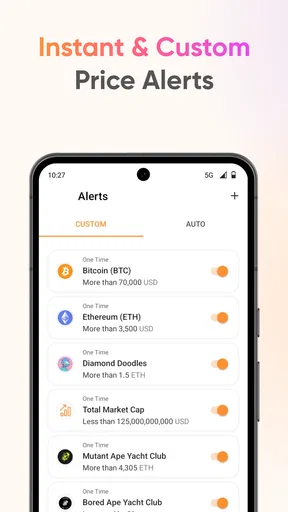
A practical first-week habit is to choose a short watchlist and a small number of price alerts rather than turning every market movement into a notification. For example, if you are holding Bitcoin and Ethereum for the long term, alerts around levels you have already decided matter may be more useful than alerts for every fluctuation. This keeps the tracker in a supporting role instead of letting it dictate when you look at your phone.
What keeps earning a place on your phone
The lasting value is the consolidated view. If you hold assets across several services, checking each one separately can make it harder to understand your overall exposure. A portfolio tracker gives you a place to review the picture before you act. I find that especially useful for a weekly check-in: note what changed, look at the chart over a meaningful period, and then close the app if nothing calls for attention.
That workflow is different from using an exchange app, which is primarily built around buying, selling, and managing activity on that particular service. CoinStats is better thought of as a monitoring layer. It can help answer, “How are my tracked holdings doing together?” It is not a substitute for checking the details inside the service where a transaction or account setting is actually managed.
The app’s value also depends on whether you trust the picture it presents. A tracker can only be as helpful as the information you enter or connect, so it is sensible to review your holdings after setup and whenever you move assets. If a total looks wrong, check the individual entries and connection status before drawing conclusions. This is a small but important habit: convenience should not turn a portfolio estimate into unquestioned accounting.
Keeping maintenance and attention under control
There is some upkeep involved. You may need to check that connected accounts still sync, correct or remove holdings that no longer reflect your activity, and revisit alerts when your priorities change. I would treat this as occasional housekeeping rather than assume a tracker will remain accurate without attention. For someone with a simple portfolio, manually keeping a few holdings up to date may be less effort than connecting every account.
Connection choices deserve care. Linking accounts can save repeated data entry, but it also means you should understand what access you are granting and use the narrowest permissions available for your purpose. A portfolio view does not require me to take extra risks just to make setup feel complete. If you are uncomfortable linking an account, starting with manual tracking is a reasonable trade-off, even if it means more maintenance.
CoinStats runs on Android 7.0 or later, is rated for Everyone, and its current version is 5.28.3. It is free to download, with in-app purchases ranging from $19.99 to $749.99 per item. I would begin with the free option and decide based on a specific need whether a paid feature is worth considering, rather than subscribing simply because the app offers more. A tracker should earn its place through a better routine, not through a growing collection of screens.
When the constant market feed becomes tiring
Crypto prices can move sharply, and an always-available chart can encourage checking far more often than is useful. Alerts are a particular trade-off: they can bring a relevant change to your attention, but too many turn a helpful tool into background noise. I would keep only alerts tied to a decision I might actually make, and silence the rest. If you are trying to reduce market anxiety, a portfolio app with live information may not be the right daily companion.
The other source of friction is breadth. A large catalogue and many analytical views can make exploration interesting, but they can also distract from the few numbers that matter to your plan. New users may need time to decide which charts or statistics are worth returning to. I would not treat extra detail as a reason to trade more; the point of tracking is to understand your position, not to manufacture activity.
Who will benefit, and who should look elsewhere
I think CoinStats fits people who hold crypto in more than one place and want a convenient overview, as well as curious beginners who are willing to learn the difference between a watchlist and their actual holdings. It may be less suitable if you only own one asset on one exchange and are already happy with that service’s portfolio screen. In that case, a separate tracker could add setup and upkeep without saving much time.
It is also not the right pick for someone looking for a straightforward budgeting app, a general investment account, or a reason to make rapid trades. Its focus is crypto monitoring. If your main need is executing transactions, your exchange’s own app is the more direct tool; if your goal is to watch a handful of prices without maintaining a portfolio, a basic market app or a simple watchlist may be enough.
What’s in the Bag?
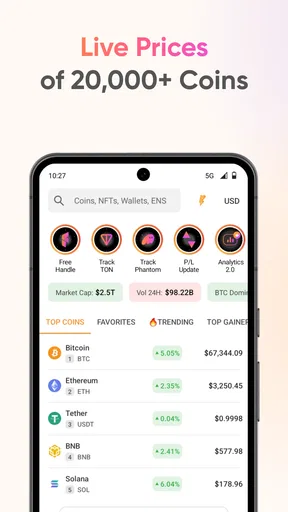
CoinStats - Crypto Tracker is like having a personal assistant for your crypto investments right in your pocket. Whether you're a seasoned trader or just getting your feet wet, this app has something for everyone. With support for over 8,000 cryptocurrencies from more than 400 exchanges, you’re covered no matter where your investments lie.
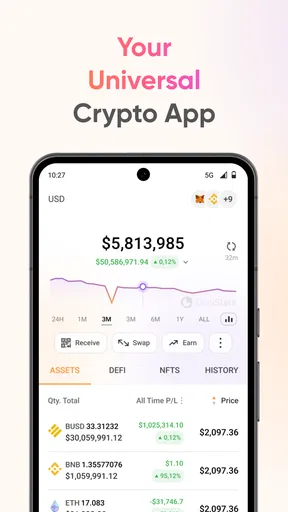
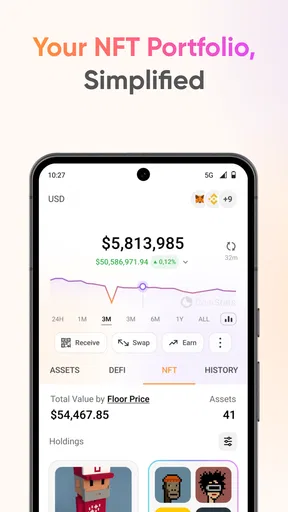
The user interface is slick and intuitive, even for those of us who aren't exactly tech wizards. Everything is laid out in a way that makes sense, so you’re not fumbling around trying to find what you need. The dashboard gives you a bird’s-eye view of your portfolio’s performance, and trust me, it’s incredibly satisfying to see those green arrows pointing up.
Highlight Features
One of the standout features is the real-time tracking. The app updates prices and market trends faster than you can say "Bitcoin." This means you’re always in the loop, which is crucial when dealing with the volatile world of crypto. Plus, the customizable alerts ensure you never miss a beat, whether it’s a price spike or a dip.
Another gem is the ability to sync your wallets and exchanges. This isn’t just a portfolio tracker; it’s a comprehensive tool that lets you connect your accounts from different platforms. You can literally manage everything in one place, saving you the hassle of jumping back and forth between apps.
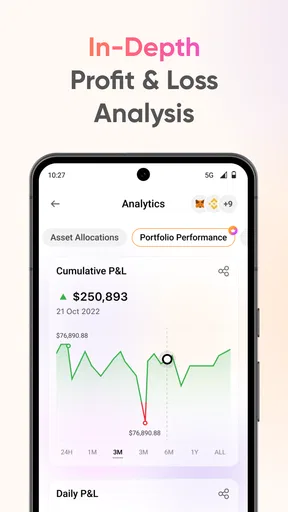
For those who love a bit of number crunching, the detailed analytics and charts will be your new best friend. You can dig deep into your portfolio’s performance, analyze trends, and make informed decisions based on solid data. I’ve spent countless hours exploring the charts, and it’s genuinely fascinating to see how your investments evolve over time.
Security and Community
Let’s talk about security because, let’s be honest, that’s a top concern when dealing with digital currencies. CoinStats takes this seriously with features like biometric authentication and API key encryption. I can sleep soundly knowing my data is safe and sound.
Moreover, the app fosters a sense of community. You can share your portfolio with friends or follow other investors to see what they’re up to. It’s like having a crypto club where everyone shares insights and tips. The community aspect is a fantastic way to learn and grow your knowledge.
Does It Have Any Flaws?
While the app is pretty stellar, it’s not without its quirks. New users might find the initial setup a bit overwhelming, especially with so many features to explore. But once you get the hang of it, it’s smooth sailing. Occasionally, there might be a lag in syncing with some exchanges, but in my experience, it’s a rare hiccup.
Another thing to note is that while the free version offers plenty of features, there are some premium features locked behind a subscription. If you’re serious about your investments, the premium might be worth the splurge, but it’s something to consider if you’re on a budget.
The Final Word
In my humble opinion, CoinStats - Crypto Tracker is a must-have for anyone venturing into the crypto universe. Its user-friendly interface, real-time updates, and comprehensive tracking capabilities make it a powerhouse tool. Whether you’re a casual investor or a crypto aficionado, this app can significantly enhance your trading experience.
If you’re ready to take control of your crypto assets, give CoinStats a whirl. It’s more than just a tracker; it’s your partner in the ever-evolving crypto landscape. So, what are you waiting for? Dive in and start tracking!
Verdict
Strengths of CoinStats - Crypto Tracker
- User-friendly interface for easy navigation.
- Supports a wide range of cryptocurrencies.
- Real-time market updates and alerts.
- Portfolio tracking with detailed insights.
- Seamless integration with multiple exchanges.
Limitations of CoinStats - Crypto Tracker
- Subscription required for advanced features.
- Some users report occasional syncing issues.
- Limited free version functionality.
- Ads present in the free version.
- No offline mode for data access.
Similar Picks in This Category
View All
Google Wallet
Google LLC4.3

Airtel: Recharge, Bank & Loans
Airtel4.0

PayPal - Pay, Send, Save
PayPal Mobile4.2

DANA Indonesia Digital Wallet
PT Espay Debit Indonesia Koe4.5

Binance: Buy Bitcoin & Crypto
Binance Inc.4.8

Cash App
Block, Inc.4.7
Frequently Asked Questions
What features does CoinStats offer for tracking cryptocurrencies?
CoinStats provides a comprehensive suite of features for tracking cryptocurrencies, including real-time price updates, portfolio management, and news aggregation. It allows users to connect multiple exchange accounts and wallets for a holistic overview. Additionally, it offers detailed charts and analytics to help make informed decisions.
How does CoinStats ensure the security of my exchange connections and wallet data?
CoinStats takes security seriously by using military-grade encryption to protect your data. The app does not store any of your API keys and uses read-only access to your accounts, ensuring your assets remain secure. It also provides an optional two-factor authentication for added security.
Is CoinStats available for both Android and iOS devices?
Yes, CoinStats is available for both Android and iOS devices. The app can be downloaded from the Google Play Store for Android users and the Apple App Store for iOS users. It offers a seamless experience across both platforms, ensuring users can track their crypto portfolios on the go.
Does CoinStats support all popular cryptocurrencies and exchanges?
CoinStats supports a wide range of cryptocurrencies and integrates with popular exchanges such as Binance, Coinbase, and Kraken, among others. The app regularly updates its list of supported coins and exchanges to ensure users can track the most current and diverse crypto assets available.
Is there a cost associated with using CoinStats, and are there any subscription options?
CoinStats offers a free version with essential features for casual users. For more advanced features, such as unlimited exchange connections and detailed analytics, there is a premium subscription available. Users can choose between monthly and yearly plans, with the latter offering a discount.
